Skip to content


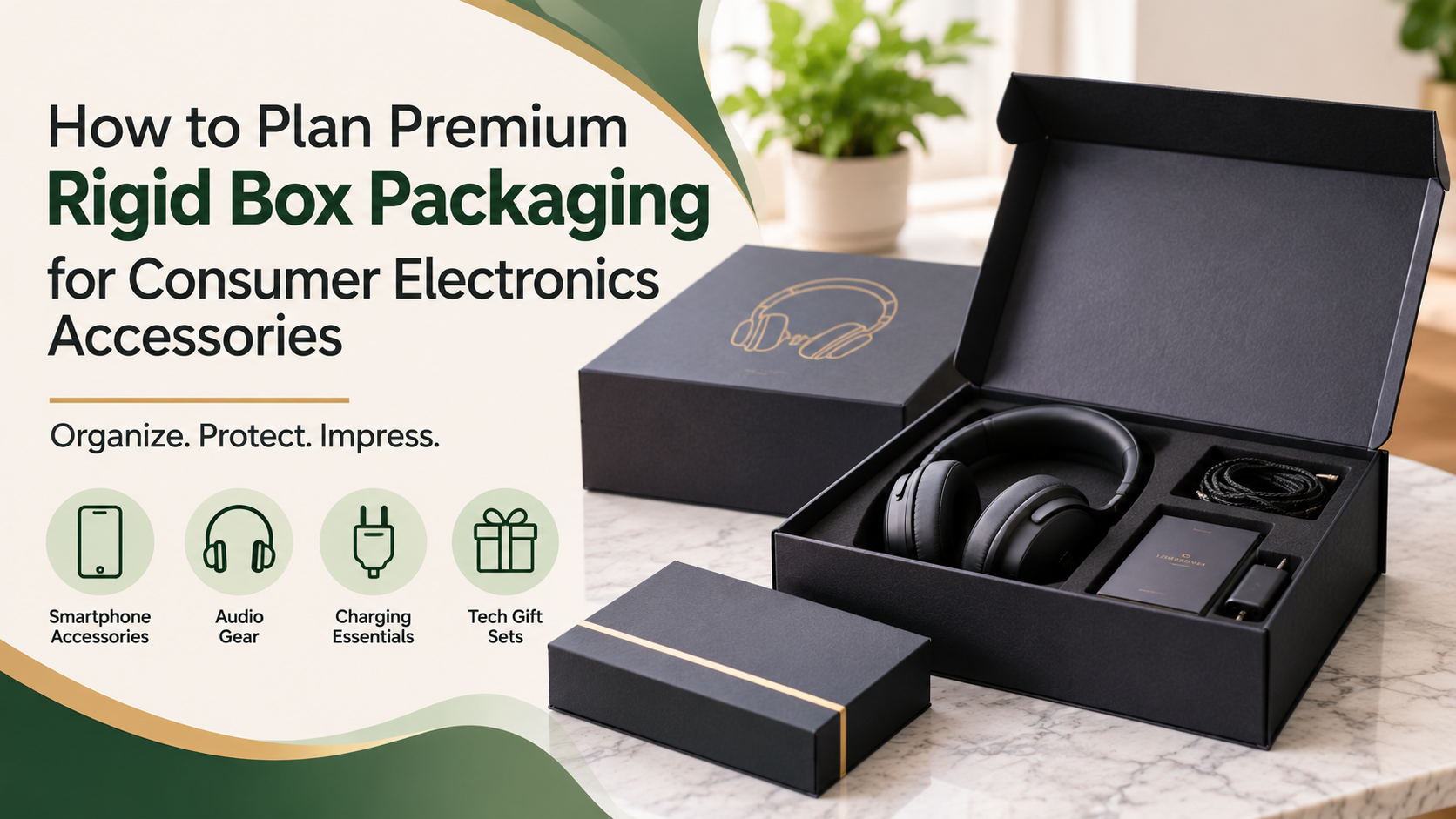



Consumer electronics products often come with several accessories. A wireless headphone set may include a charging cable, adapter, user manual, and carrying case. A mobile accessory kit might contain a charger, cable, protective cover, and other small components.
Presenting these items together requires more than an attractive outer box. Businesses need packaging that keeps the product set organized, makes individual components easy to identify, and creates a consistent brand experience.
This is where rigid box packaging for electronics accessories can be useful. Its sturdy construction and customizable presentation make it an option for brands selling premium technology products, accessory kits, and gift collections.
In this guide, we explain how to plan rigid box packaging around different electronics accessories without repeating generic box-size or insert-material advice.
Why Use Rigid Boxes for Electronics Accessories?
Electronics accessories are often sold as individual products, bundles, or complete kits. Their packaging needs can vary depending on the number of components, their appearance, and how customers will receive them.
A premium rigid box offers a structured presentation for products that need more than a basic retail carton.
Businesses may consider rigid packaging for:
- Wireless earbuds and charging accessories.
- Headphones with cables and carrying cases.
- Mobile phone accessory collections.
- Premium charging kits.
- Computer accessories and peripherals.
- Technology gift sets and promotional collections.
The main advantage is the opportunity to present multiple components together in an organized package while maintaining a consistent branded appearance.
However, a rigid box should be selected according to the product’s actual requirements. Premium presentation alone does not guarantee sufficient protection during shipping.
1. Identify Every Component in the Accessory Set
Start by listing everything that will be included in the package.
A product bundle may contain several components that serve different purposes. If you plan the packaging around the main device alone, smaller accessories can become an afterthought.
For example, a wireless headphone package might include:
| Component | Packaging consideration |
|---|---|
| Headphones | Main product presentation |
| Charging cable | Separate, organized placement |
| Carrying case | Space for its actual packed shape |
| User manual | Accessible document placement |
| Warranty card | Clear and consistent presentation |
Create a similar list for every product collection.
This helps your packaging team understand what needs to be included before deciding how the complete set should be presented.
Also identify which items are standard in every package and which vary between product versions.
2. Group Accessories by Their Purpose
Not every accessory needs to be presented in the same way.
Some components belong together because customers use them together. Others may be better positioned separately to make the package easier to understand.
For example, a charging kit could contain a power adapter, charging cable, and a small instruction card.
A headphone package may have a different arrangement because the headphones are the main product, while the cable and documentation are supporting components.
Grouping products by their function helps create a more logical presentation.
Consider these categories:
- Main device or primary accessory.
- Power and charging components.
- Connectivity accessories.
- Protective or carrying accessories.
- Printed documentation.
The final layout should make it easy for customers to recognize what is included without searching through the package.
For more guidance on organizing products inside premium packaging, explore our guide to custom rigid box inserts and learn how different insert arrangements support product presentation.
3. Plan the Packaging Layout Around the Customer Experience
A premium accessory package should have a clear opening sequence.
Customers should be able to understand where the main product is placed and where to find the additional components.
Think about the order in which someone will see the contents after opening the box.
For example, a headphone gift set could present the headphones first, followed by the charging cable and user documentation in their designated areas.
A mobile accessory collection might place its main product in the most visible position while keeping smaller components organized nearby.
When planning the layout, consider:
- Which product should customers see first?
- Are the accessories easy to identify?
- Can each component be removed comfortably?
- Are important instructions easy to locate?
- Does the arrangement look organized when the box is opened?
These decisions help turn packaging into a more intentional product presentation rather than simply a container for several items.
4. Choose a Rigid Box Structure That Matches the Product Set
Different rigid box styles create different opening experiences.
The right structure depends on how customers will access the accessories and how the brand wants the package to look.
Two-Piece Rigid Boxes
Two-piece boxes use a separate lid and base.
They can work for accessory gift sets, premium retail collections, and products where a simple lift-off opening is appropriate.
Magnetic Closure Rigid Boxes
Magnetic closure boxes provide a hinged opening with a concealed magnetic closure.
They may suit premium technology gift sets and branded accessory collections where the opening experience is part of the presentation.
Drawer-Style Rigid Boxes
Drawer-style packaging uses a sliding tray enclosed within an outer sleeve.
This structure can create a different reveal experience and may be suitable for compact accessory collections.
Before selecting a style, consider how frequently customers will open the package, how the components are arranged, and whether the structure fits your retail or gifting requirements.
Brands comparing different packaging structures can also read our rigid box design guide for additional guidance on box styles and structural considerations.
5. Keep Product Variations Organized
Electronics accessories often come in different models, colors, and configurations.
For example, a headphone brand may sell the same product in black, white, and silver. Another collection might include a standard version and a premium bundle with additional accessories.
Using one packaging design for every variation may be possible, but the decision should be based on the actual contents.
Create a packaging specification for each product version.
| Product version | Included components | Planning requirement |
|---|---|---|
| Standard kit | Main product + cable | Basic accessory arrangement |
| Premium kit | Main product + cable + case | Additional presentation space |
| Gift collection | Main product + accessories + card | Coordinated branded presentation |
This table is an illustrative planning example.
For your own products, record the exact components and approved packaging arrangement. This makes it easier for employees to identify the correct package during order preparation.
6. Use Branding to Create a Consistent Technology Product Experience
Electronics packaging should reflect the product’s positioning.
A premium headphone collection may use a different visual direction from an everyday charging accessory kit.
The exterior design can help communicate product identity through logo placement, color selection, typography, and printed graphics.
Consider these branding elements:
Logo placement: Keep the brand name visible without making the design unnecessarily crowded.
Color consistency: Use brand colors that complement the product and its intended market.
Product identification: Clearly distinguish product models and variations.
Interior presentation: Coordinate the inside of the box with the exterior design.
Printed information: Include only the details customers need to identify or use the product.
The objective is to create packaging that looks connected to the product rather than like a generic gift box.
7. Plan Packaging for Retail and Promotional Collections
The same electronics accessory set may be sold through different channels.
A retail product may need packaging that communicates the product name and contents clearly. A corporate promotional kit may place more emphasis on brand identity and coordinated presentation.
Consider the intended use before finalizing the packaging.
Retail Accessory Sets
Retail packaging should make the product and included components easy to recognize.
The exterior should communicate the brand and product category while keeping essential information readable.
Corporate Technology Gifts
Corporate gift collections may contain chargers, headphones, USB accessories, or other branded technology products.
These packages often need a consistent visual identity across multiple items.
Promotional Product Kits
Promotional kits may include accessories from different product categories.
Plan the presentation so the contents look coordinated rather than like unrelated items placed together.
The packaging layout should reflect the purpose of the collection and the expectations of its intended recipient.
Businesses developing packaging for different technology products can also explore our custom electronics boxes for additional product-specific packaging options.
8. Prepare Packaging Specifications Before Requesting a Quote
A packaging supplier needs clear information before recommending a suitable rigid box.
Simply requesting a premium box for electronics accessories does not explain how many components need to fit inside or how the final package should look.
Prepare a specification that includes:
- Main product name and model.
- Complete accessory list.
- Number of items in each package.
- Product dimensions and packed weight.
- Preferred rigid box structure.
- Branding and printing requirements.
- Interior presentation preferences.
- Intended use: retail, gifting, or promotional distribution.
- Estimated order quantity.
If you have several product versions, provide a separate component list for each one.
Clear specifications make it easier to discuss suitable customization options and avoid misunderstandings during the ordering process.
9. Review a Complete Sample Before Bulk Ordering
A digital design can show the proposed appearance, but a physical sample helps you evaluate the complete package.
Test the sample with the actual product and all accessories.
Check whether every component is presented correctly and whether customers can access the contents without difficulty.
Review these points:
- Is the main product positioned as intended?
- Are all accessories included?
- Is each component easy to identify?
- Can customers remove the items comfortably?
- Does the lid or closure operate properly?
- Does the exterior artwork match the approved design?
- Does the complete package look consistent with the brand?
For additional guidance on evaluating packaged products during distribution, review the ISTA packaging test procedures and select testing appropriate to your shipping conditions.
Do not assume that a premium rigid structure automatically provides all the protection an electronic device requires.
Document any changes and approve the final sample before proceeding with a larger order.
10. Coordinate With Your Rigid Box Packaging Supplier
Once the product arrangement and packaging requirements are clear, share the complete specification with your supplier.
Discuss the preferred structure, exterior design, branding, customization options, and sample approval process.
For electronics accessory collections, explain whether the same packaging format will be used across multiple models or product variations.
You can also discuss how future accessories may affect the package design.
Planning for product variations at the beginning can make future packaging updates easier to manage.
Rigid Box Packaging Checklist for Electronics Accessories
Before placing a bulk order, review the following:
- List every product and accessory in the package.
- Identify standard and optional components.
- Decide which item should be presented first.
- Select a suitable rigid box structure.
- Plan branding and product identification.
- Prepare specifications for each product variation.
- Confirm the complete package arrangement.
- Review a physical sample with actual products.
- Check the opening and product-removal experience.
- Evaluate shipping protection separately where required.
A clear checklist helps keep product presentation and packaging requirements aligned.
Explore Custom Rigid Boxes for Electronics Accessories
Premium electronics accessories deserve packaging that reflects their value and keeps the complete product collection organized.
The Boxology.US offers customizable rigid box solutions for businesses looking to develop branded packaging for retail products, electronics, cosmetics, and gift collections.
Whether you are preparing headphone kits, charging accessory collections, or technology gift sets, start with a clear list of components and your preferred presentation style.
Explore our custom rigid boxes to discuss box structures, printing, dimensions, and customization options for your electronics accessory collection.